CPU Memory Architecture: Foundations and GPU Differences
Explore CPU memory architecture, its importance in deep learning, and key differences from GPUs.
Understanding how CPUs manage memory is the foundation for grasping why GPUs are so powerful for deep learning. This post explains CPU memory architecture, how CPUs handle computation, and the fundamental differences compared to GPUs.
Understanding CPU Memory Hierarchy
CPU memory architecture is a hierarchical system designed to balance three critical factors: speed, capacity, and cost. Think of it as a carefully orchestrated pyramid where each layer serves a specific purpose in managing data efficiently.
Key Components:
- Registers: Tiny, ultra-fast memory inside each CPU core. Used for immediate calculations and temporary values.
- L1 Cache: Fastest cache, closest to the core. Stores frequently accessed data and instructions.
- L2/L3 Cache: Larger, slightly slower caches. L2 is per-core, L3 is shared across cores. Bridges the gap between L1 and RAM.
- Main Memory (RAM): Large, relatively slow. Stores program data, weights, and intermediate results.
Analogy: Imagine an office:
- Registers: Your hands (instant access)
- L1 Cache: Desk drawer (very fast, small)
- L2/L3 Cache: Filing cabinet in your office (moderate speed, bigger)
- RAM: Archive room down the hall (large, slower)
The Critical Importance of Memory Hierarchy
The memory hierarchy is fundamental because it solves the “memory wall” problem - the growing gap between processor speed and memory access time. Without this architecture, even the fastest CPU would spend most of its time waiting for data.
Critical Performance Impact:
- Speed Gap: RAM access takes ~100-300 CPU cycles, while L1 cache takes only 1-2 cycles. This 100x difference makes hierarchy essential.
- Energy Efficiency: Cache access consumes 10-100x less energy than RAM access, critical for battery life and power consumption.
- Parallelism: Multi-level caches enable multiple CPU cores to work simultaneously without interfering with each other.
- Predictive Performance: Hardware prefetchers anticipate data needs, loading information before it’s requested.
Why This Matters for Deep Learning: CPU memory architecture directly impacts training and inference performance. Poor memory management can make your neural network training 10-100x slower, regardless of your algorithm efficiency.
Real-World Consequences:
- Without proper hierarchy: Your laptop would be unusable, taking minutes to open simple applications
- With optimized hierarchy: Smooth multitasking, instant app switching, responsive user interfaces
- For ML practitioners: Understanding this helps you write more efficient code and choose the right hardware
Applications Across Computing Environments
CPU memory hierarchies are ubiquitous - found in virtually every computing device you interact with daily. The principles remain consistent across scales, from tiny microcontrollers to supercomputers.
Computing Environments:
- Personal Computing: Desktops, laptops, tablets, smartphones - enabling smooth multitasking and responsive applications
- Enterprise Systems: Servers powering cloud computing, databases, web hosting, and enterprise applications
- Embedded Systems: IoT devices, automotive computers, smart appliances, industrial controllers
- High-Performance Computing: Supercomputers, research clusters, financial trading systems
- Edge Computing: AI inference chips, autonomous vehicles, real-time processing systems
Specific Deep Learning Context:
- Training Workstations: CPU handles data preprocessing, model compilation, and coordination
- Inference Servers: CPU optimizations critical for low-latency prediction serving
- Edge Deployment: Mobile and IoT devices running lightweight models
- Hybrid Systems: CPU-GPU coordination in modern ML pipelines
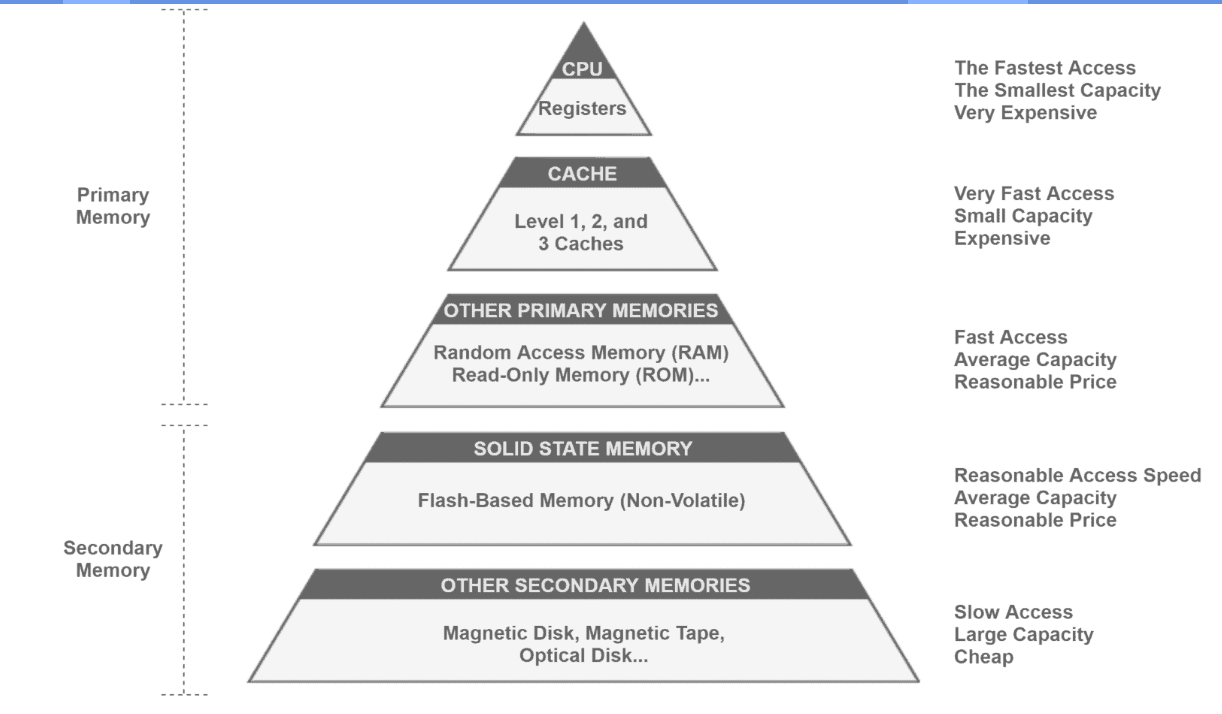
Typical CPU cache hierarchy showing the speed-capacity trade-off (Source: Wikipedia)
Evolution and Optimal Use Cases
Historical Timeline:
- 1960s-1970s: Simple two-level hierarchy (registers + main memory). Performance bottlenecks were severe.
- 1980s: First cache implementations in high-end processors (IBM 801, MIPS R2000)
- 1990s: L1 cache became standard; L2 cache introduced (Intel Pentium, PowerPC)
- 2000s: L3 cache, multi-core architectures, sophisticated prefetching (Intel Core series)
- 2010s-Present: Advanced cache hierarchies, non-uniform memory access (NUMA), specialized caches
When CPU Memory Architecture Excels:
Best Use Cases:
- Sequential processing: Tasks requiring complex logic, branching, and decision-making
- Low-latency requirements: Real-time systems, interactive applications, system control
- Complex workflows: Operating systems, compilers, databases with complex queries
- Small-scale parallel tasks: Multi-threaded applications with moderate parallelism
When CPU Limitations Become Apparent:
- Massive data parallelism: Training large neural networks, matrix operations
- High-throughput computing: Processing thousands of similar operations simultaneously
- Memory-bandwidth intensive: Applications needing to move large amounts of data quickly
For Deep Learning Context:
- Use CPU for: Data preprocessing, model serving, small models, edge deployment
- CPU struggles with: Large model training, massive matrix multiplications, high-throughput inference
Target Audiences and Success Stories
Creators and Innovators:
- Hardware Architects: Intel, AMD, Apple, ARM engineers designing next-generation processors
- Computer Scientists: Researchers developing new cache algorithms, prefetching strategies
- System Designers: Building everything from smartphones to supercomputers
Professional Users:
- Software Engineers: Writing cache-friendly code for performance optimization
- ML Engineers: Understanding why their training code runs slowly and how to optimize it
- Systems Administrators: Configuring servers for optimal performance
- Game Developers: Optimizing real-time performance for responsive gameplay
Who Should Learn This:
- Deep Learning Practitioners: Understanding CPU-GPU coordination and data movement costs
- Performance Engineers: Anyone optimizing application performance
- Computer Science Students: Fundamental knowledge for systems programming
- Technology Leaders: Making informed hardware and architecture decisions
Success Stories:
- Apple M1/M2: Unified memory architecture achieving laptop performance with phone-level power consumption
- Intel x86: Decades of cache optimization enabling modern computing
- AMD Zen: Cache innovations bringing competitive performance to enterprise and consumer markets
- Deep Learning Inference: Cache-optimized CPUs enabling real-time AI applications in mobile devices
Memory Hierarchy Operations and Mechanisms
CPU memory hierarchy operates through sophisticated cache management algorithms and hardware optimizations designed to minimize the performance impact of slow memory access.
Core Mechanism: Cache Hierarchy Operations
1. Cache Line Management: Data moves between memory levels in fixed-size “cache lines” (typically 64 bytes). When you request 1 byte, the entire 64-byte line is loaded, exploiting spatial locality.
2. Cache Hit/Miss Cycle:
1
2
3
4
CPU Request → Check L1 Cache → Hit? Return data (1-2 cycles)
                            → Miss? Check L2 Cache → Hit? Return data (10-20 cycles)
                                                   → Miss? Check L3 → Hit? Return (20-40 cycles)
                                                                    → Miss? RAM (100-300 cycles)
3. Replacement Policies: When cache is full, algorithms decide what to evict:
- LRU (Least Recently Used): Remove data accessed longest ago
- Random: Simple but effective for some workloads
- Adaptive: Modern CPUs use sophisticated prediction algorithms
Advanced Features
Hardware Prefetching: CPUs analyze memory access patterns and proactively load data they predict you’ll need next. This can reduce effective memory latency by 50-90%.
Cache Coherency (Multi-core): When multiple cores share data, the memory system ensures consistency using protocols like MESI (Modified, Exclusive, Shared, Invalid).
Real-World Example: Neural Network Forward Pass
1
2
3
4
5
6
7
8
# Loading model weights and input data
weights = model.layer1.weight  # Loaded into L3 cache (shared)
input_batch = dataloader.next()  # Loaded into L2 cache (per-core)

# Matrix multiplication: weights @ input_batch
# CPU prefetcher loads next rows of weights into L1
# Results stored in registers during computation
# Final output written back through cache hierarchy
Performance Impact:
- Cache-optimized code: 10-100x faster execution
- Cache-unfriendly patterns: Can make CPU slower than GPU even for simple tasks
- Memory layout matters: Contiguous data access dramatically improves performance
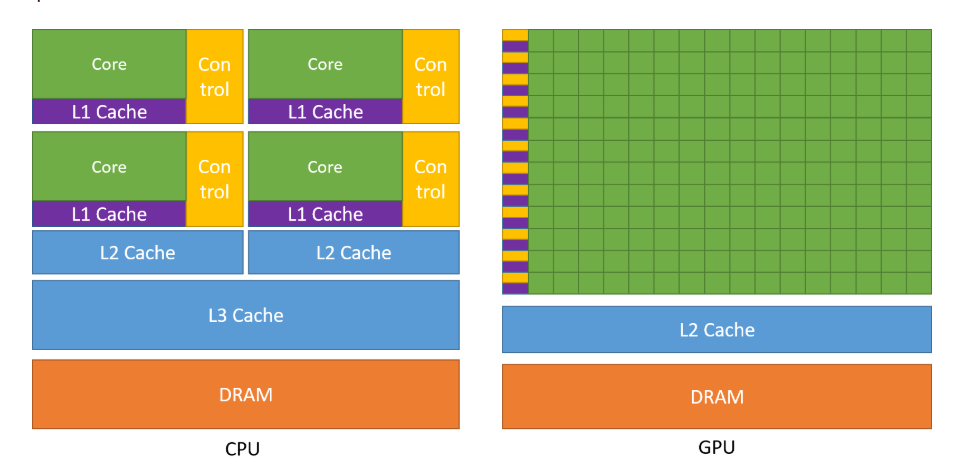
Typical CPU cache hierarchy showing the speed-capacity trade-off (Source: Wikipedia)
Key Differences: CPU vs GPU Memory Architecture
While both CPUs and GPUs use memory hierarchies, they are optimized for fundamentally different workloads, leading to radically different designs.
Architectural Philosophy Comparison
| Aspect | CPU (Latency-Optimized) | GPU (Throughput-Optimized) |
|---|---|---|
| Core Design | 4-32 powerful, complex cores | 1000-10000 simple, efficient cores |
| Cache Strategy | Large, smart caches (32MB+ L3) | Smaller caches, massive shared memory |
| Memory Type | DDR4/5 (100-200 GB/s) | HBM (1000+ GB/s bandwidth) |
| Control Logic | Complex branch prediction, out-of-order execution | Simple, in-order execution |
| Thread Management | Few threads, heavy context switching | Thousands of lightweight threads |
| Programming Model | Automatic cache management | Explicit memory hierarchy control |
Memory System Differences
CPU Memory Hierarchy:
1
2
Registers (32-64 per core) → L1 Cache (32-64KB) → L2 Cache (256KB-1MB) → L3 Cache (8-64MB) → DDR RAM (8-128GB)
     ↑ Optimized for low latency, complex prefetching, branch prediction
GPU Memory Hierarchy:
1
2
Registers (1000s per SM) → Shared Memory (64-164KB) → L2 Cache (4-40MB) → HBM/GDDR (16-80GB)
     ↑ Optimized for high bandwidth, simple access patterns, massive parallelism
Why This Matters for Deep Learning
CPU Strengths:
- Complex logic: Perfect for data preprocessing, irregular computations
- Low latency: Ideal for real-time inference, interactive applications
- Memory flexibility: Can handle diverse data structures and access patterns
- Cost efficiency: Better performance/dollar for small-scale tasks
GPU Advantages:
- Massive parallelism: Excels at matrix multiplications, convolutions
- Memory bandwidth: Can feed thousands of cores simultaneously
- Energy efficiency: Better FLOPS/watt for parallel computations
- Specialized hardware: Tensor cores accelerate specific ML operations
The Chef vs Factory Analogy:
- CPU: Master chef who can prepare any complex dish quickly, but limited to a few orders at once
- GPU: Automated factory line that can produce thousands of identical items simultaneously, but inflexible for custom orders
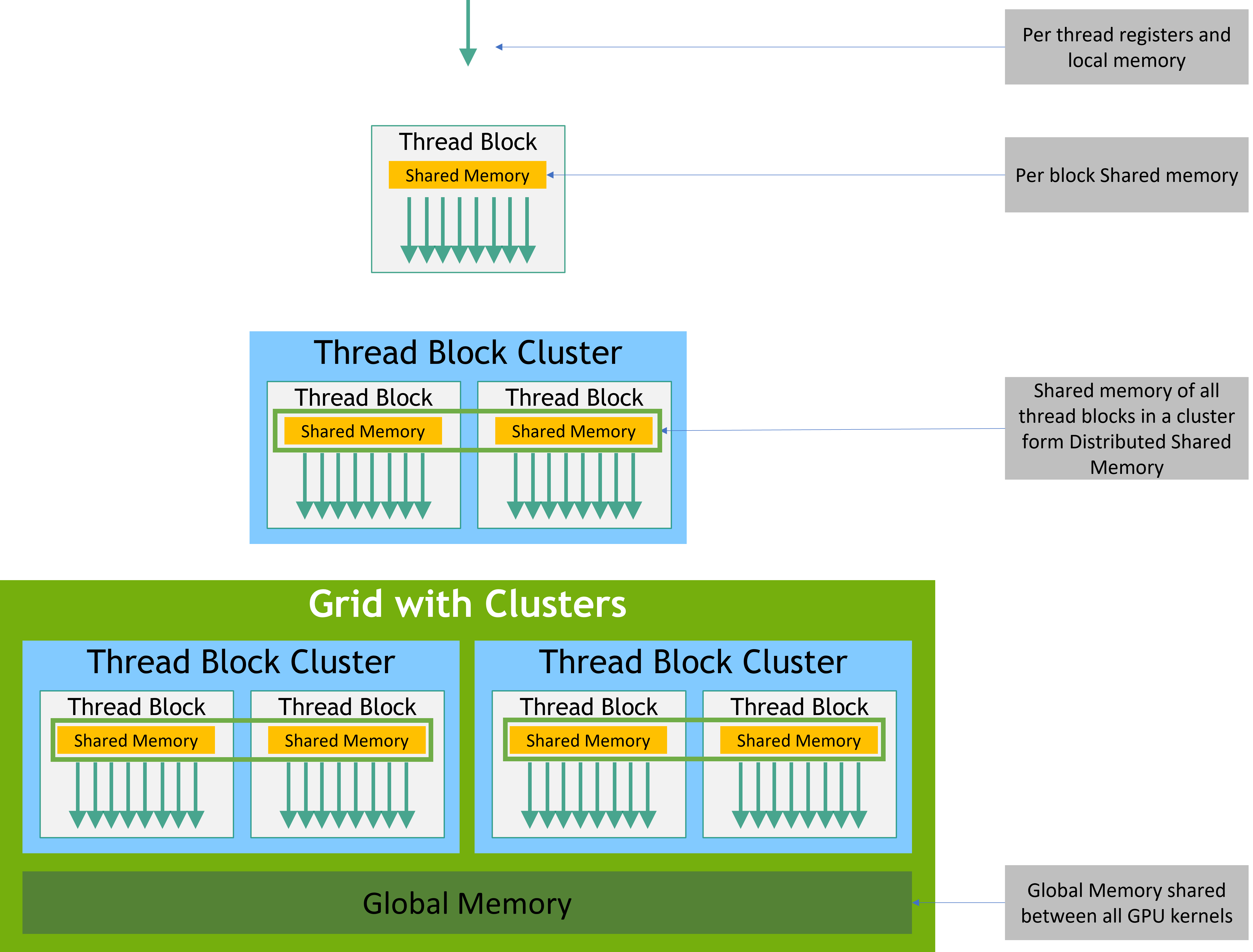
GPU memory hierarchy designed for massive data parallelism (Source: NVIDIA CUDA Programming Guide)
Deep Learning Performance Implications
Understanding CPU memory architecture is crucial for optimizing your entire ML pipeline, not just the training phase. Many performance bottlenecks in deep learning occur outside the GPU.
Critical Impact Areas:
Data Pipeline Optimization:
- Bottleneck: Loading and preprocessing data on CPU while GPU waits
- Solution: Understanding cache-friendly data layouts and prefetching strategies
- Impact: Can improve total training time by 20-50%
Model Serving and Inference:
- CPU-only deployment: Mobile devices, edge computing, cost-sensitive applications
- Hybrid serving: CPU handles request routing, preprocessing; GPU handles model inference
- Latency requirements: CPU memory hierarchy directly affects response times
Development and Debugging:
- Understanding slowdowns: Why your “fast” algorithm runs slowly
- Memory profiling: Identifying cache misses and memory bottlenecks
- Hardware selection: Choosing the right CPU for your ML workstation
Real-World Example:
1
2
3
4
5
6
7
8
9
# Cache-unfriendly pattern (slow)
for i in range(model.num_layers):
    for batch_idx in range(num_batches):
        process_layer(model.layers[i], batches[batch_idx])

# Cache-friendly pattern (fast)
for batch_idx in range(num_batches):
    for i in range(model.num_layers):
        process_layer(model.layers[i], batches[batch_idx])
The second pattern keeps model layers in cache while processing each batch, dramatically improving performance.
Key Takeaways
CPU Memory Architecture Fundamentals:
- Architecture: Hierarchical system balancing speed, capacity, and cost through registers, L1/L2/L3 caches, and RAM
- Purpose: Solves the memory wall problem, enabling modern computing performance and energy efficiency
- Applications: Ubiquitous across all computing devices, from smartphones to supercomputers
- Evolution: Developed from simple two-level systems to sophisticated multi-level hierarchies; excels at sequential, low-latency tasks
- Relevance: Critical knowledge for ML engineers, performance engineers, and anyone optimizing applications
- Operations: Functions through cache management, prefetching, and replacement algorithms optimized for temporal and spatial locality
CPU vs GPU Trade-offs:
- CPU: Optimized for latency, complex logic, and sequential processing with sophisticated cache hierarchies
- GPU: Optimized for throughput, simple parallel tasks, with high-bandwidth memory and massive core counts
- Deep Learning Fit: CPUs excel at data preprocessing and serving; GPUs dominate training and large-scale inference
Practical Implications:
- Memory hierarchy understanding enables 10-100x performance improvements in cache-friendly code
- CPU-GPU coordination is critical for optimizing end-to-end ML pipelines
- Hardware architecture knowledge guides better algorithm and infrastructure decisions
What’s Next?
Now that you understand CPU memory fundamentals, we’ll explore how GPUs take a radically different approach to achieve massive parallelism. In Part 1: GPU Memory Hierarchy, we’ll dive into the details of GPU memory architecture and discover how it enables the high-performance computing that makes modern deep learning possible.
References: